Circle-to-Line Distance
Overview
The circle-to-line distance feature calculates the distance between a circle and a line. After selecting the circle and the line, the software displays an options dialog where you can choose the distance calculation method.
Steps
Step 1: Click the Function Button
In the Measurement Bar, click the Circle-to-Line Distance button.
Step 2: Select a Circle and a Line
In the Vision Area or Geometry Area, select a circle element and a line element in sequence.
Step 3: Choose the Distance Calculation Method
After selection, the software displays an options dialog with the following methods:
- Center to Line: Calculates the perpendicular distance from the circle center to the line
- Longest Distance: Calculates the distance from the farthest point on the circle to the line
- Shortest Distance: Calculates the distance from the nearest point on the circle to the line
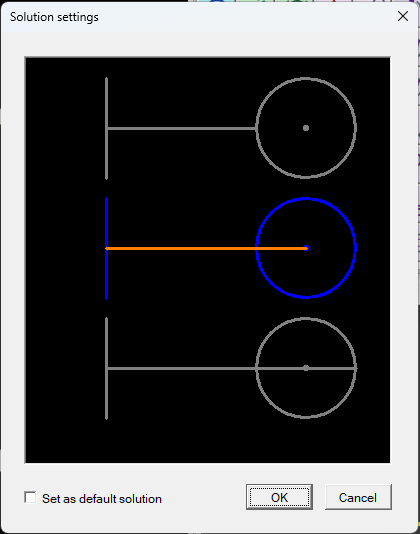
After selecting the desired method, the software will automatically calculate and output the corresponding distance value.
Notes
- Selection order is flexible — you can select the circle first or the line first
- Choose the distance calculation method that best fits your measurement needs
- The result can be used in subsequent tolerance analysis