Concentricity
Overview
Concentricity evaluates the deviation of a measured element's center or axis from the center or axis of a datum element. In Easson2D, 2D circles typically compare center-to-center distance, while 3D circles or cylinders compare the shortest distance to the datum axis. Results are output as a diameter value.
Steps
Step 1: Click the Function Button
Click Concentricity in the Tolerance menu to open the geometric tolerance dialog.
Step 2: Select Elements
Select circle or arc elements in the Vision Area or Geometry Area:
- The first click selects the measured element
- The second click selects the datum element
Step 3: Create Label (Optional)
To create a label, check Create Label before confirming. Left-click in the Vision Area or Geometry Area to place the label at the desired position.
Calculation Principles
2D circles compare center-to-center distance; 3D circles or cylinders compare the shortest distance to the datum axis. Results are generally output as a diameter value (multiplied by 2).
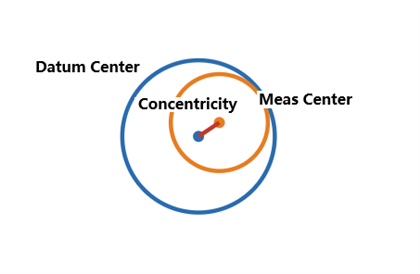
Formula (2D)
d = √[(x₁ - x₂)² + (y₁ - y₂)²]
Concentricity = 2 × d
Example Calculation (2D Circle-to-Circle)
Given:
- Circle 1 center O₁ = (12.010, 8.004)
- Circle 2 center O₂ = (12.000, 8.000)
Step 1: Calculate the center-to-center distance
d = √[(12.010 - 12.000)² + (8.004 - 8.000)²]
d = √[(0.010)² + (0.004)²]
d = √(0.000100 + 0.000016)
d = √0.000116 ≈ 0.01077 mm
Step 2: Output as diameter value
Concentricity = 2 × 0.01077 ≈ 0.0215 mm
Example Calculation (3D Circle-to-Axis)
Given:
- Measured circle center A = (5.012, 3.000, 2.000)
- Datum axis defined by B(5.000, 3.000, 0.000) and C(5.000, 3.000, 10.000)
- Shortest distance from A to axis BC: d = 0.012 mm
Coaxiality = 2 × d = 2 × 0.012 = 0.024 mm
Notes
- Both the measured element and the datum element must be circle or arc elements
- The selection order matters: select the measured element first, then the datum element
- Results are output as a diameter tolerance zone value (multiplied by 2)