Position
Overview
Position tolerance evaluates the deviation of a point, circle center, or spatial center from its theoretical position. In Easson2D, the system first determines the theoretical position, then calculates the distance between the actual and theoretical positions, and outputs the result as a diameter tolerance zone value.
Steps
Step 1: Click the Function Button
Click Position in the Tolerance menu to open the geometric tolerance dialog.
Step 2: Select the Measured Element
In the Vision Area or Geometry Area, select a point, circle, or arc element as the measured element.
Step 3: Configure Reference
- If a true theoretical position is known, enter the coordinate values directly in the dialog
- If a datum element is required, check Datum Element and click to select the datum element
Step 4: Create Label (Optional)
To create a label, check Create Label before confirming. Left-click in the Vision Area or Geometry Area to place the label at the desired position.
Calculation Principles
The system first determines the theoretical position, then calculates the distance between the actual and theoretical positions, and outputs the result as a diameter tolerance zone value (result × 2).
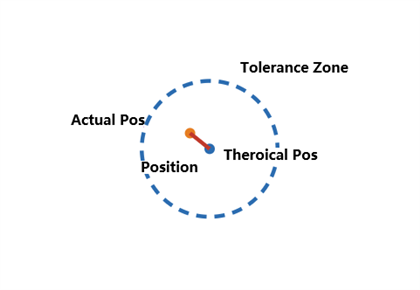
Formula
2D:
d = √[(x₁ - x₂)² + (y₁ - y₂)²]
Position = 2 × d
3D:
d = √[(x₁ - x₂)² + (y₁ - y₂)² + (z₁ - z₂)²]
Position = 2 × d
Example Calculation (2D, with datum)
Given:
- Actual center A = (10.012, 5.009)
- Datum center B = (0.000, 0.000)
- Theoretical offset = (10.000, 5.000)
- Theoretical center T = B + offset = (10.000, 5.000)
Step 1: Determine the theoretical center
Theoretical center T = (10.000, 5.000).
Step 2: Calculate the distance from actual to theoretical center
d = √[(10.012 - 10.000)² + (5.009 - 5.000)²]
d = √[(0.012)² + (0.009)²]
d = √(0.000144 + 0.000081)
d = √0.000225 = 0.015 mm
Step 3: Output as diameter tolerance zone
Position = 2 × d = 2 × 0.015 = 0.030 mm.
Note: The result is multiplied by 2 because the system outputs the diameter of the tolerance zone, not the radius.
Notes
- The measured element can be a point, circle, or arc
- True position coordinates are optional — enter them when the ideal coordinates of the measured element are known
- The datum element is also optional — use it only when required by the tolerance specification
- Labels can be placed flexibly as needed