Two-Circle Tangent
Overview
The two-circle tangent feature generates two common tangent lines between two circles. After selecting two circle elements, the software displays an options dialog where you can choose the tangent direction (internal or external tangents), and the software automatically generates the two corresponding line elements.
Steps
Step 1: Click the Function Button
In the Measurement Bar, click the Two-Circle Tangent button.
Step 2: Select Two Circles
In the Vision Area or Geometry Area, select two circle elements in sequence.
Step 3: Choose the Tangent Direction
After selection, the software displays an options dialog where you can choose the desired tangent direction type.
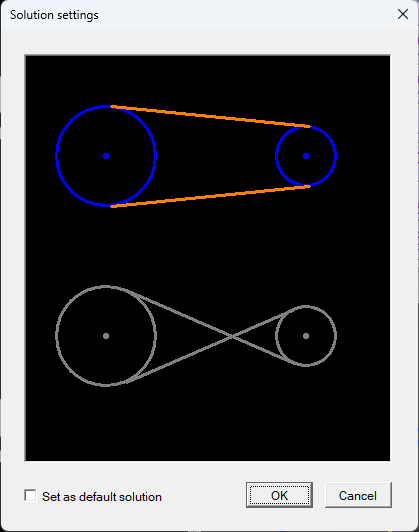
After selecting the direction, the software will automatically generate the two corresponding tangent lines as line elements.
Notes
- Selection order is flexible — it does not matter which circle you select first
- If one circle fully contains the other and they do not intersect, some tangent lines may not be generated
- The two generated tangent lines can be used in subsequent element construction and tolerance analysis