Parallelism
Overview
Parallelism evaluates the parallel deviation of a measured element relative to a reference element. In Easson2D, the system first establishes an ideal parallel reference based on the datum element, then calculates the distance from representative points on the measured element to that reference, and takes the maximum value within the effective evaluation length as the parallelism result.
Steps
Step 1: Click the Function Button
Click Parallelism in the Tolerance menu to open the geometric tolerance dialog.
Step 2: Select Elements
Select line elements in the Vision Area or Geometry Area:
- The first click selects the measured element
- The second click selects the datum element
Step 3: Create Label (Optional)
To create a label, check Create Label before confirming. Left-click in the Vision Area or Geometry Area to place the annotation at the desired position.
Calculation Principles
The system first establishes an ideal parallel reference based on the datum element, then calculates the maximum distance from the measured element to that ideal parallel reference.
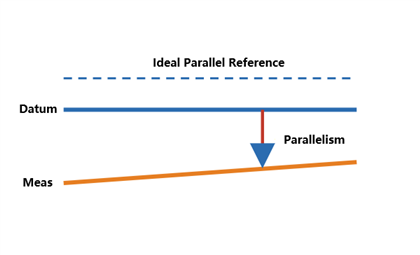
Common branches include: line-to-line parallelism, plane-to-plane parallelism, and axis-to-axis parallelism (cylinder/cone).
Formula
Given an ideal parallel reference line passing through A(x₁, y₁) and B(x₂, y₂), and a representative point P(x₀, y₀) on the measured line, the distance from P to the ideal reference line is:
d = |(y₂ - y₁)x₀ - (x₂ - x₁)y₀ + x₂y₁ - y₂x₁| / √[(y₂ - y₁)² + (x₂ - x₁)²]Parallelism = max(dᵢ)
Example Calculation (Line-to-Line)
Given:
- Datum element: D1 = (0.000, 0.000), D2 = (20.000, 0.000)
- Measured element: M1 = (0.000, 5.000), M2 = (20.000, 5.012)
- Evaluation length L = 20.000 mm
Step 1: Establish the datum direction
D1 and D2 form a horizontal line. The direction is along the X axis.
Step 2: Establish the ideal parallel reference
Through M1, parallel to the datum: A = (0.000, 5.000), B = (20.000, 5.000), i.e. y = 5.000.
Step 3: Calculate distances
- M1 = (0.000, 5.000): d₁ = 0.000 mm
- M2 = (20.000, 5.012): d₂ = |5.012 - 5.000| = 0.012 mm
Step 4: Take the maximum
Parallelism = max(0.000, 0.012) = 0.012 mm
Other Branches
- Plane-to-plane parallelism: Calculates the maximum deviation of representative points on the measured plane relative to the datum plane
- Axis-to-axis parallelism: Establishes an ideal parallel axis from two axis endpoints and calculates the maximum distance from the measured axis to that reference
Notes
- Both the measured element and the datum element must be line elements
- The selection order matters: select the measured element first, then the datum element
- Labels can be placed flexibly as needed