Symmetry
Overview
Symmetry tolerance evaluates the symmetrical deviation of two measured elements relative to a datum element. In Easson2D, common cases include two lines relative to a datum line, or two circle centers relative to a datum line.
Steps
Step 1: Click the Function Button
Click Symmetry in the Tolerance menu to open the geometric tolerance dialog.
Step 2: Select Elements
Select three line elements in the Vision Area or Geometry Area:
- The first two clicks select the measured elements
- The third click selects the datum element as the symmetry axis
Step 3: Create Label (Optional)
To create a label, check Create Label before confirming. Left-click in the Vision Area or Geometry Area to place the label at the desired position.
Calculation Principles
The system evaluates the symmetrical deviation of two measured elements relative to a datum element. Using two circles relative to a datum line as an example, the system calculates the theoretical symmetric point of the first element relative to the datum, then compares the actual position of the second element against this theoretical point.
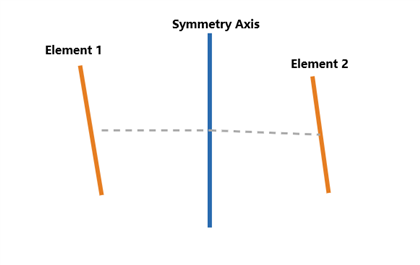
Example Calculation (Two Circles Relative to a Datum Line)
Given:
- Circle 1 center A = (8.000, 5.010)
- Datum line: x = 10.000
- Mirror point of A about the datum line: F = (12.000, 5.010)
- Circle 2 actual center B = (12.008, 5.004)
Step 1: Determine the theoretical symmetric point
The mirror point of A about datum x = 10.000: F = (12.000, 5.010).
Step 2: Calculate the deviation from the theoretical symmetric point
d = √[(12.008 - 12.000)² + (5.004 - 5.010)²]
d = √[(0.008)² + (-0.006)²]
d = √(0.000064 + 0.000036)
d = 0.010 mm
Step 3: Output as width value
Symmetry = 2 × d = 2 × 0.010 = 0.020 mm
Notes
- Exactly three line elements must be selected: the first two are measured elements, the third is the datum symmetry axis
- The selection order matters and must not be reversed
- Results are output as a width value (multiplied by 2)